
If you employ people in the UAE private sector, you pay them through the Wage Protection System. It is simple in principle and unforgiving in practice: a salary file that does not match what the Ministry holds is rejected, and since June 2026 a late payment is visible to the Ministry from the day after it was due.
What is the UAE Wage Protection System?
The Wage Protection System, or WPS, is an electronic salary transfer system run by the Ministry of Human Resources and Emiratisation (MOHRE). Employers registered with MOHRE pay wages through an approved agent, such as a bank or an exchange house, and the payment is recorded against each employee. That record lets the Ministry see whether every employee was paid, how much, and when.
The 2026 rules below apply to employers under MOHRE, and also to employers in Jebel Ali Free Zone and the Dubai Multi Commodities Centre. Other free zones may run their own arrangements, so check which rules apply to each of your entities.
What changed in 2026?
MOHRE issued Ministerial Resolution No. 340 of 2026, which took effect on 1 June 2026. It made three changes that matter to every payroll team:
- One due date for everyone. Salaries are due on the first day of each month. There is no grace period; a salary paid after the first is late.
- An 85 percent threshold. An employer counts as compliant if it pays at least 85 percent of the total wages due by the deadline, and each worker receives at least 85 percent of their entitled salary, lawful deductions aside.
- A timetable of consequences. Action begins the day after the deadline and escalates the longer wages stay unpaid.
| Days after the due date | What happens |
|---|---|
| Day 2 | Electronic monitoring begins, with notifications and alerts to the employer. |
| Day 5 | No new work permits are issued. |
| Day 11 | Administrative fines, and the company can be reclassified to the third category. |
| Day 16 | A labour dispute is registered automatically, individual or collective. |
| Day 21 | Enforcement action, with collective dispute procedures and possible referral to the Public Prosecution for larger employers, and a possible travel ban on the person responsible. |
The practical effect is that the first of the month is now a hard deadline, and a payroll that needs two or three days of manual fixes after the run has closed is a compliance risk rather than an inconvenience.
How does a WPS salary file work?
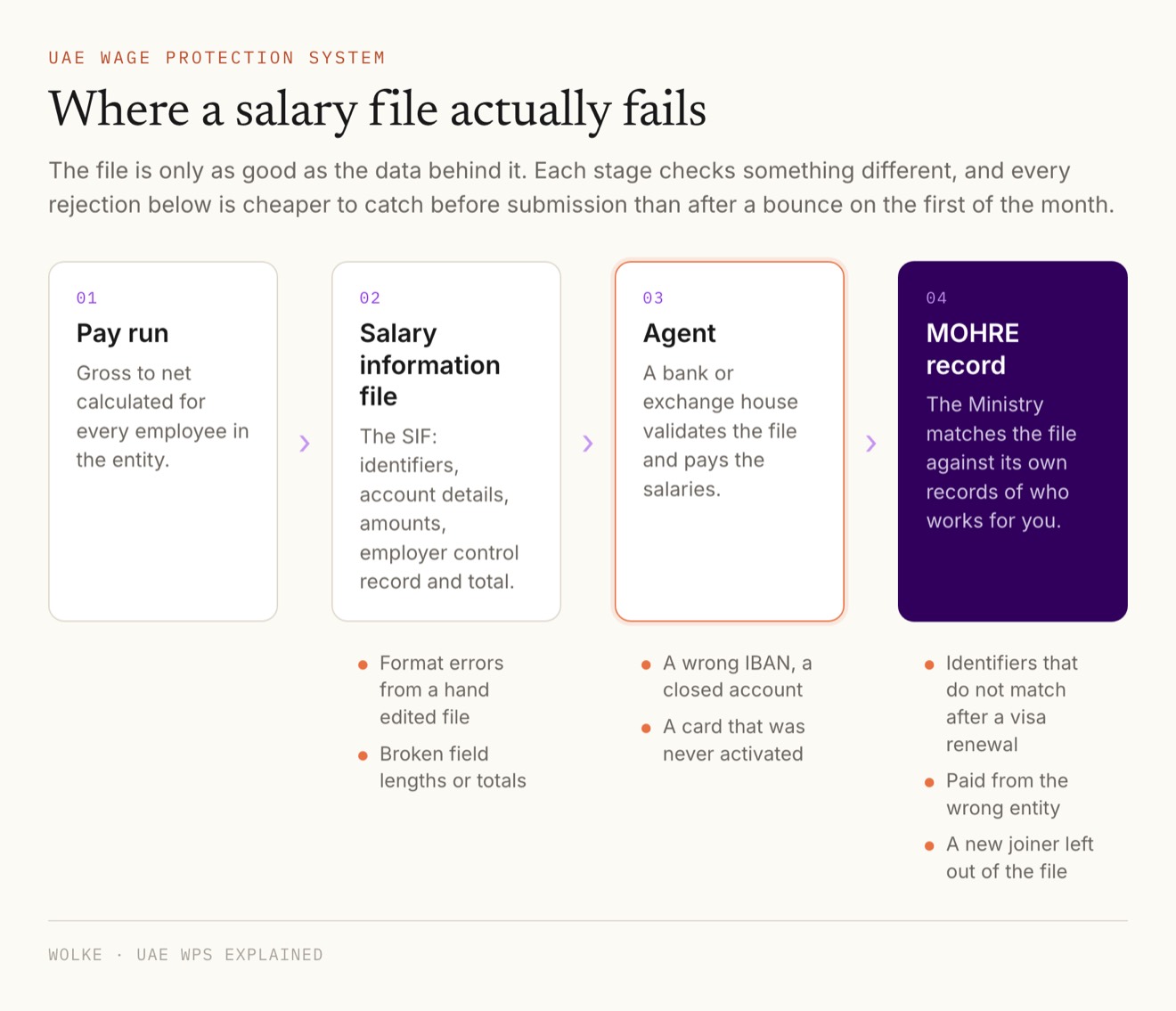
Each month the employer produces a salary information file, usually called the SIF, in the format the agent and the Ministry expect. It lists each employee with their identifiers, the bank or card account the salary goes to, and the amounts paid, together with a control record for the employer and the total. The agent validates the file, pays the salaries, and reports the payment to the Ministry.
Because the Ministry matches the file against its own records, the file is only as good as the data behind it. Most WPS problems are data problems that surface at the worst possible moment.
Why do WPS files get rejected?
The causes are usually mundane, which is why they are so frustrating:
- Identifiers that do not match. An employee’s personal or labour number in the file differs from what MOHRE holds, often after a visa renewal or a transfer between entities.
- Account details. A wrong IBAN, a closed account or a card that has not been activated.
- The wrong employer. An employee is paid from an entity other than the one that holds their work permit.
- Missing people. Someone on the Ministry’s records, such as a new joiner or an employee on leave, is left out of the file.
- Format errors. A hand edited file that breaks the agent’s layout, field lengths or totals.
Every one of these is cheaper to catch before the file is submitted than after it bounces, and under the 2026 rules a bounce on the first of the month is the start of a clock.
How do you stay compliant every month?
- Run payroll from the employee record, not from a spreadsheet copy of it, so a visa renewal or an entity transfer updates the salary file automatically.
- Validate before you submit. Check the file against the format and against each employee’s current details, and fix the exceptions before the agent sees them.
- Close earlier. Plan the cycle so the run is approved with days to spare, not hours.
- Pay everyone who is due. Leavers, joiners and people on leave are where the 85 percent threshold is most often missed.
How Wolke handles WPS
Almost everything above is a data problem that surfaces too late: a record that was already wrong when the file was built, discovered at the agent instead of in the run.
- Rejections found before you submit. The salary file is generated from the pay run and validated against the MOHRE format first, and employees whose records would cause a rejection are flagged rather than buried in the batch.
- A second country is not a second process. Qatar and Bahrain files are produced from the same run, with the same checks.
- A deadline you can hit every month. Each run is compared with the previous cycle line by line, and nothing pays until a person approves it, so the work of getting the file right sits before the deadline rather than after a rejection.
- The check is done by AI, inside the record. It reads the run against the previous cycle and against each country’s rules and puts what looks wrong in front of a payroll officer, including a field that would bounce at the agent. It reads the live record rather than an export, on the same permissions and audit trail as everything else, and it never approves or pays.
How the pay run and the salary file are produced together is on the Payroll and WPS page.